
Published on

HIPAA (Health Insurance Portability and Accountability Act) is the U.S. law that protects patient health information. In an ABA clinic, everything from behavior charts to progress notes can be considered private health data. Choosing HIPAA-compliant software isn’t optional; it’s a legal and ethical must.
If client data leaks or is misused, your practice can face severe consequences. Beyond fines, a breach destroys trust with families. HIPAA compliance means protecting your clients and your clinic’s reputation. In this article, you will learn why HIPAA compliance is crucial for ABA practice.
Key Security Features to Look For
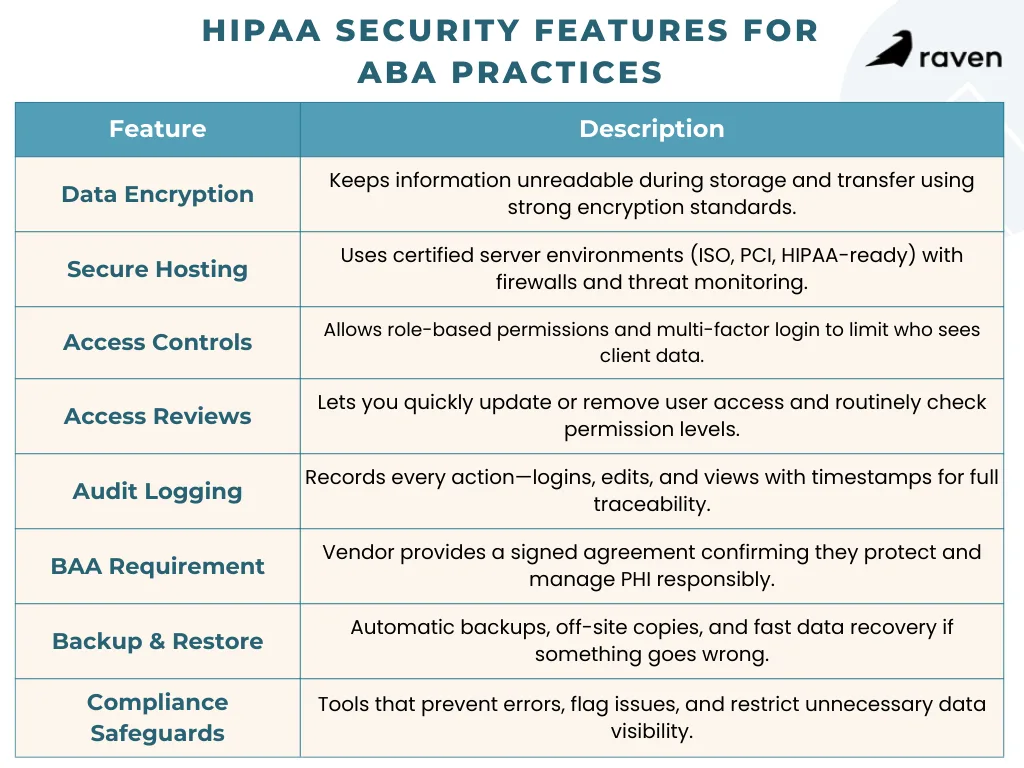
When evaluating ABA software, insist on built-in safeguards for protected health information (PHI). Here are the critical features and controls:
1. Strong Encryption
The software should encrypt data both at rest (when it’s stored) and in transit (when it moves over networks). Look for industry-standard encryption like AES-256. This scrambles data so attackers can’t read it even if they intercept it. For example, reputable services use 256-bit AES encryption on stored files and SSL/TLS for all web traffic.
2. Secure Hosting Standards
Check that the vendor’s servers meet recognized security standards (ISO 27001, PCI DSS, or HIPAA-ready cloud hosting). Data centers should use firewalls and intrusion detection and allow you to manage encryption keys if possible. A vendor compliance page or data sheet should mention these certifications or audits.
3. Access Controls & Authentication
The software must let you create user accounts with role-based permissions. For instance, a Registered Behavior Technician (RBT) should see only their assigned clients’ data, while a Board Certified Behavior Analyst (BCBA) or admin might have broader access.
Also require Multi-Factor Authentication (MFA); logging in should require more than just a password (such as a code from an app or text). These measures ensure that if a device or password is compromised, the attacker still can’t easily access PHI.
4. Regular Access Reviews
It should be easy to add or remove users and to review permissions. Good software lets you instantly revoke access when an employee leaves and quickly adjust roles as people switch jobs. Regularly auditing who can see what is a core HIPAA practice.
5. Comprehensive Audit Trails
Every action, including logins, data views, edits, and deletes, should be logged with a timestamp and user ID. HIPAA requires that you be able to prove what happened, when, and by whom. A compliant system will keep real-time logs of all activity.
This means if someone updates a behavior goal or enters session notes, that event is recorded immediately. You can then review the history during an internal check or external audit.
6. Business Associate Agreement (BAA)
Any vendor hosting or processing PHI must be willing to sign a BAA. This legal contract makes the vendor responsible for protecting your data. Never use software without a BAA. In fact, under HIPAA rules, the software provider is treated as a business associate and can be held directly liable for breaches. Always get the BAA in writing before you start using the system.
7. Automated Backups & Recovery
Confirm the system runs regular off-site backups and that data can be restored easily. Ideally, the vendor uses a “3-2-1” strategy (three copies of your data, on two types of media, with one copy offsite). Test the restore process. If there’s a ransomware attack or server failure, you must be able to recover quickly without losing weeks of client progress notes.
8. Built-In Compliance Features
Bonus points for ABA-specific safeguards. Some systems automatically flag or block errors. For example, good platforms might alert you if a clinician’s certification has lapsed, preventing billing for an unlicensed practitioner.
Others enforce minimum necessary rules so front-desk staff can schedule sessions without seeing clinical details. These workflow guardrails keep people honest without slowing them down.
Balancing Security with Usability
High security is crucial, but if the software is too rigid, clinicians may resort to unsafe workarounds (like shadow charting on paper). Conversely, a system that’s too careless risks missing data or unauthorized access. The best HIPAA-compliant ABA tools are designed to be secure by default but user-friendly.
Workflow Integration
Choose software that fits ABA workflows. For example, make sure mobile apps let therapists collect data in homes or schools and sync it immediately. Real-time sync means everything is logged right away, so nothing falls through the cracks.
Intuitive Role Use
When guardrails like role-based limits are built into the user interface, staff barely notice them. For example, a BCBA logging in might automatically see all supervisory data and the full patient record, whereas an RBT sees only their session programs and notes.
Parents or teachers accessing the portal see only their child’s progress. This keeps data safe without extra steps for users.
Offline Capability
Many ABA teams work on tablets or laptops without constant internet. Good HIPAA software caches the data offline and uploads it securely when back online. This way, therapists stay productive, and the audit trail is updated seamlessly once connected.
Compliance Built In
Look for features that enforce compliance quietly. For instance, automatic activity logs, timeout logouts, and encrypted local storage. The software should handle the hard parts (like encryption and logging) in the background so your staff can focus on therapy.
Conclusion
HIPAA compliance is critical for any ABA practice handling client data. The right software will shield sensitive information without getting in your way. At a minimum, look for AES-256 encryption, role-based access with multi-factor logins, audit logs that capture every action in real time, a signed BAA, and regular backups and recovery plans.
By carefully evaluating testing software in real workflows and confirming security measures, ABA practices can protect PHI, maintain compliance, and support efficient clinical operations.
Sources:
Encryption Best Practices for Protecting ePHI in the Cloud
HIPAA Compliance and Cloud Technologies: 5 Ways to Optimize Your Data Security
Enhancing HIPAA Compliance in the Cloud
Security Rule Guidance Material | HHS.gov