Choosing software to run your Applied Behavior Analysis (ABA) clinic is one of the biggest operational decisions you'll make. It touches scheduling, data collection, billing, and nearly everything your team does each day.
If you pick a system that costs too much or scales poorly, it will slowly eat into your margins. As you compare vendors, you'll notice most of them use one of two billing structures.
Some platforms charge you based on the number of children you treat, while others charge based on the number of employees you hire.
Understanding the math behind these two models matters. A plan that looks inexpensive on day one can cost far more by month six once your clinic starts growing.
Here's how to break down the costs and protect your cash flow.
How Per-Client and Per-User Pricing Work
Most ABA software vendors don't charge one flat monthly fee, since a solo BCBA and a multi-location organization use the software very differently. Instead, they tie your monthly bill to the size of your operation.
Per-Client Pricing
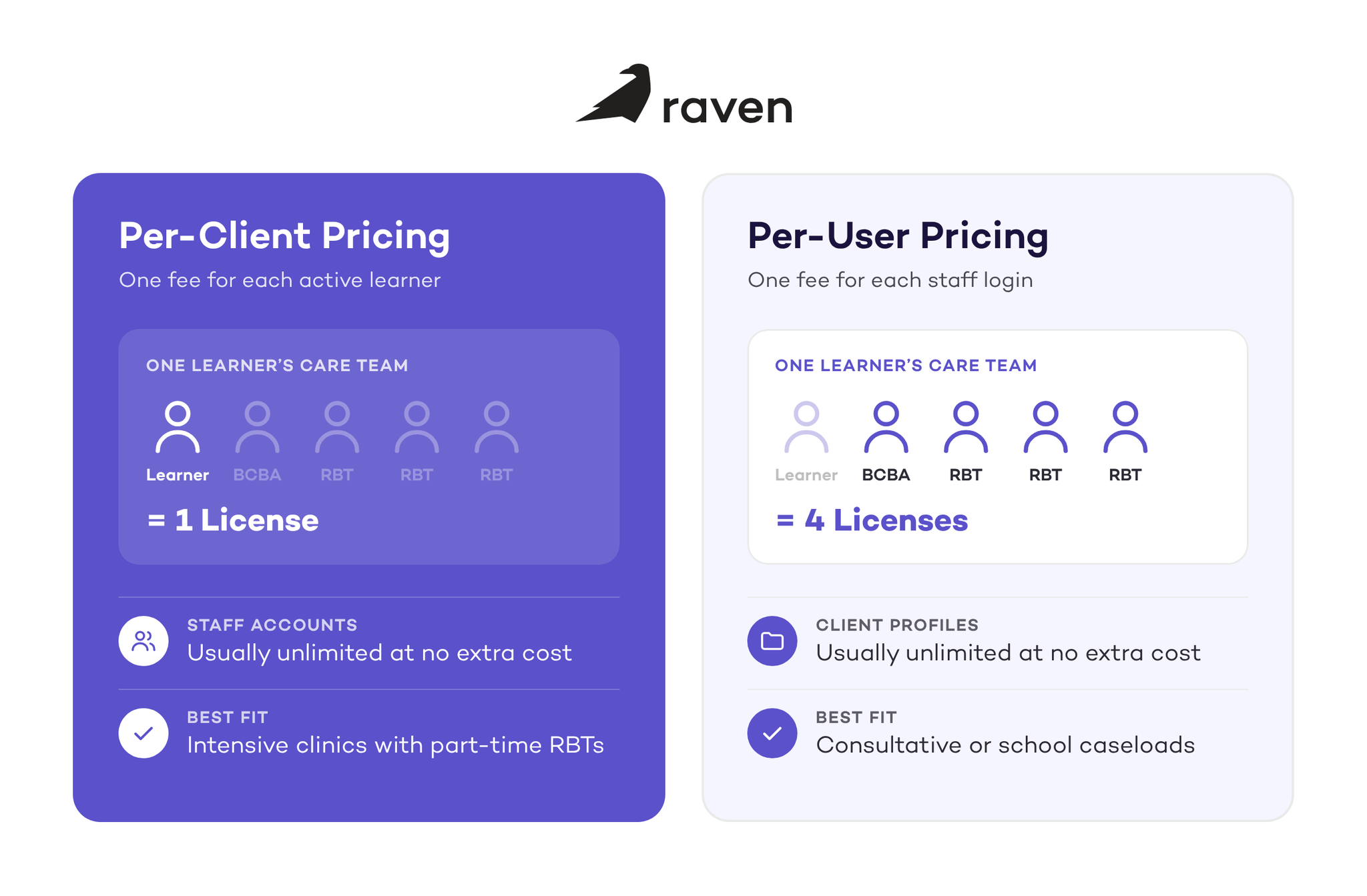
Under this model, you pay a monthly fee for every active learner receiving services at your clinic. Published rates generally range from about $5 to $50 per active client each month, depending on which features are included.
If you have twenty learners on your roster, you pay for twenty licenses. In exchange, the software company usually lets you create unlimited staff accounts at no extra cost.
Per-User Pricing
This model flips the math. You pay a monthly fee for each employee who logs into the system. Published rates range from about $29 to $150 per staff member per month.
If you have one clinical director, two Board Certified Behavior Analysts (BCBAs), and ten Registered Behavior Technicians (RBTs), you pay for thirteen licenses. However, you can usually add as many client profiles as you need without your bill going up.
Pros and Cons of Each Pricing Model
Neither model is inherently bad, but each one affects your cash flow differently depending on how your clinic operates.
The Per-Client Model
Pros
This model ties your software costs to your revenue. You only pay for a license when you have an active client generating billable hours.
It also removes the cost of hiring. You can bring on part-time technicians, an intake coordinator, and a billing specialist without your software bill going up.
Cons
If a learner pauses services for a month due to illness or a family trip, you may still pay their monthly fee if their profile stays active. Archiving inactive clients regularly keeps you from overpaying.
The Per-User Model
Pros
If your clinicians carry large caseloads, like a school consultation model where one BCBA oversees thirty students, this model can be very affordable. You pay for the one BCBA's seat, and the thirty student profiles cost nothing extra.
Cons
Many ABA clinics rely on part-time behavior technicians, since sessions often fall after school and work hours. If you hire three behavior technicians who each work ten hours a week, you still pay for three full licenses.
Paying full software fees for part-time staff cuts into your margins. You also start paying for a new hire's license on day one, even though onboarding and training can take weeks before they deliver billable sessions.
How to Calculate the Total Cost of ABA Software
Looking at the sticker price on a vendor's website rarely tells you the true cost of running the software. Read the fine print and ask about extra fees to estimate your real monthly cost.
Check the Base Fees and Minimums
Some vendors advertise a low per-client rate but require a monthly minimum spend in the contract.
Others add a flat monthly base fee on top of the per-client rate. Ask for a full quote based on your current caseload so you can compare vendors side by side.
Look for Implementation Costs
Setting up healthcare software takes time. Many vendors charge a one-time implementation fee to cover setup, data migration, and training. Ask what's included so you know what you're paying for.
Watch for Split Modules
When a vendor quotes you a low price, ask whether it includes both practice management (billing and scheduling) and clinical data collection. Some platforms price these separately.
You might be quoted one rate for practice management, then a second per-client fee if you want your technicians to collect behavior data on their tablets.
Account for Data Export Fees
Always ask what happens if you decide to leave. Some vendors bill hourly to export your own clinical and billing records if you switch software later.
Which Pricing Model Is Best for Your ABA Practice?
Choosing the right structure comes down to the makeup of your clinical team and how you deliver services.
If you run an intensive ABA clinic where a learner receives twenty to forty hours of therapy a week, the per-client model is usually the safer and more profitable choice.
In this setup, one learner is often supported by a BCBA and a rotating team of two or three part-time behavior technicians.
If you pay per user, you're paying for three or four software seats to serve one learner. A per-client model rolls those costs into one fee tied to that learner's authorization, so you can hire the part-time staff you need to cover every shift without raising your software bill.
This is the model Raven Health uses. Our Platform and Platform Pro packages are priced per client and include unlimited staff and caregiver licenses, so adding RBTs never raises your software bill. If you'd rather hand billing to our team, our Concierge packages are priced as a percentage of claims paid instead. You can compare every package on our pricing page.
On the other hand, if you're a solo BCBA focused on parent training, or your full-time analysts carry large caseloads of low-intensity clients, the per-user model can make more financial sense.
Your goal is to match your expenses to your revenue. Take your current staff roster and client list, apply each vendor's quote, and project what those numbers look like when your clinic doubles in size.
The right software partner will scale with your growth instead of penalizing you for hiring the staff you need.
Conclusion
Your ABA software should help your clinic grow, not become a hidden expense that eats into your margins. Before signing a long-term contract, look closely at how your team actually works.
If you rely on a large team of part-time technicians providing intensive, daily therapy, per-client pricing will keep your costs predictable.
If your clinic relies on a few full-time analysts managing large school or consultation caseloads, paying per user will likely save you money.
Whatever you choose, calculate the extra fees, project your growth for the next year, and pick a partner that grows with you. Want to see how per-client pricing could work for your team? Schedule a demo with Raven.
Sources:
https://linksaba.com/how-to-choose-aba-practice-management-software/
https://www.alpacahealth.io/provider-resources/aba-ehr-software-guide